Space Free
€0 per month
- Up to 15 resources: desks, rooms and parking spaces mixed
- Unlimited users
- Sign-in with Microsoft Entra ID
- Floor plan and parking editor
- One location, booking in the browser and as an app
TOMORIS.Space books desks, meeting rooms and parking spaces with EV charging on floor plans. Sign-in runs through Microsoft Entra ID. Up to 15 resources Space is free, for any number of users. Try every Premium feature for 30 days without payment details.
Space Free up to 15 resources · Unlimited users · Premium €5.90 per resource and month, net plus VAT.
Already have access? Sign in
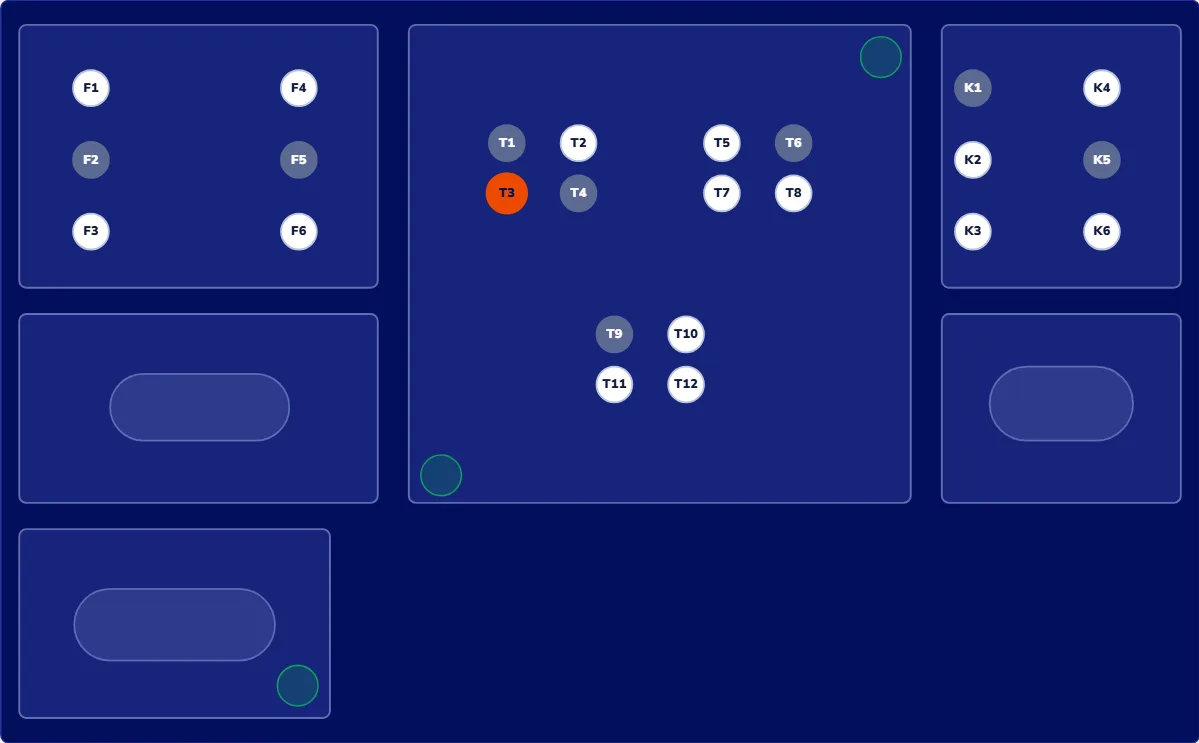
Screenshot from TOMORIS.Space, sample data
We count bookable resources, not people. Space Free is not a trial with an end date: up to 15 resources it stays free.
€0 per month
without payment details
€5.90 per resource and month, at least €199.00
With an annual contract the personal setup worth €990.00 is on us.
Desks, rooms and parking, plans, presence and analytics in one place. Where your IT has to approve something or a feature belongs to Premium, we say so.
Pick a day, tap a free desk on the floor plan, done. Full or half day, as a series, with favourites and a waiting list. Guest booking with Premium.
Rooms sit on the same plan and are booked in Space. Confirmation through the room’s Exchange resource mailbox needs the Outlook connection. It is available today with a dedicated instance, not yet in the shared tenant service on space.tomoris.com.
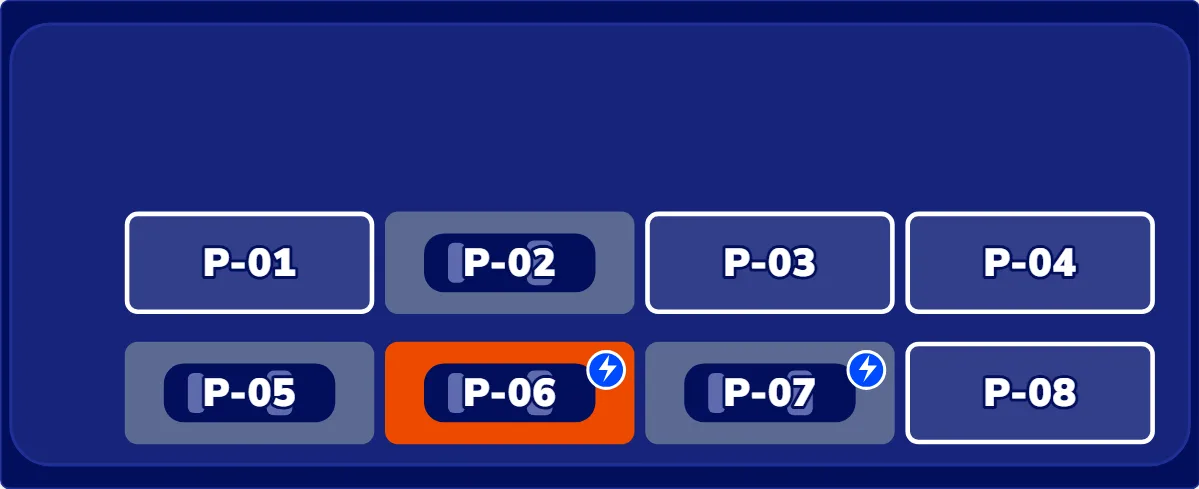
A dedicated parking plan with free, taken and your own spaces. Charging spaces are marked and can be filtered; creating EV charging spaces is part of Premium.
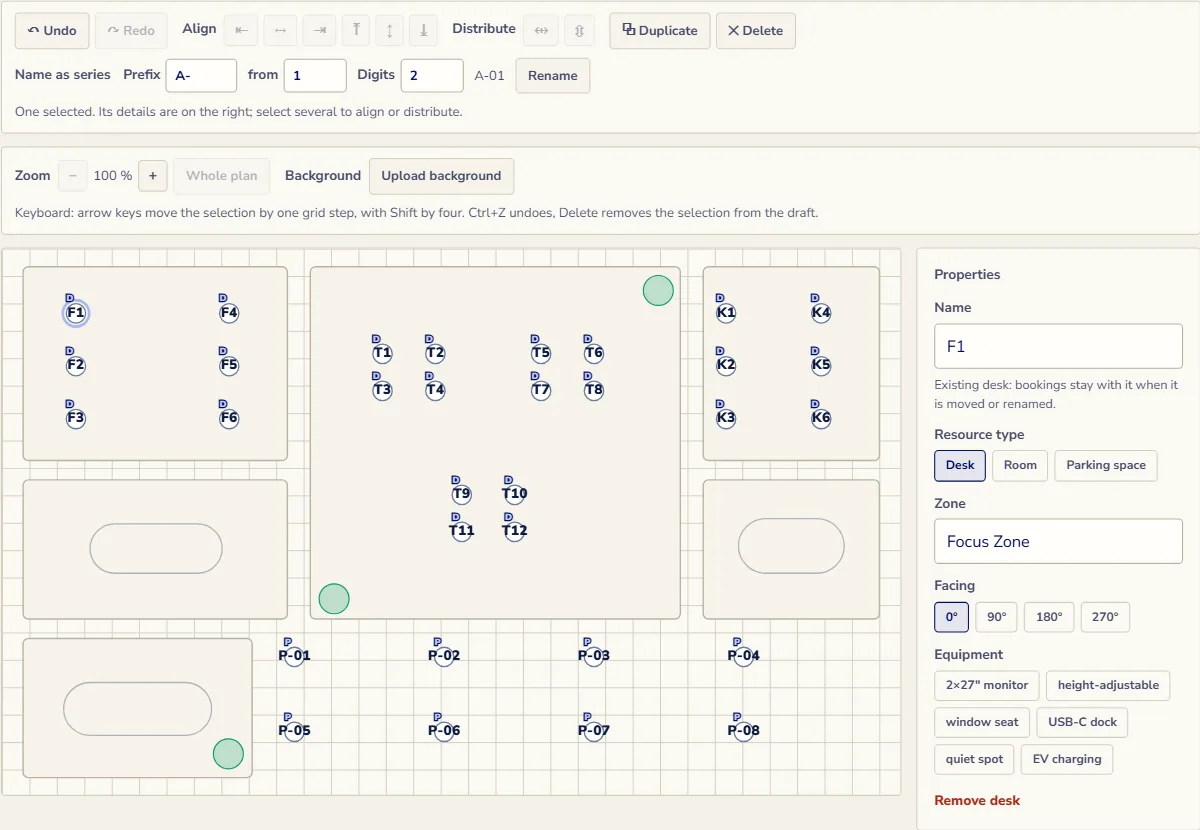
Build the floor plan from ready-made shapes or upload it as an image (SVG, PNG, JPEG, GIF, WebP), then place, align and duplicate desks. Changes stay a draft until you publish them.
Drag, rotate and resize parking spaces, with grid, zoom, keyboard control and undo. Draft with preview first, then publish explicitly.
Confirmed own bookings appear as appointments in the Outlook calendar, changes and cancellations follow. Today with a dedicated instance and your Exchange administration. Not yet available for tenants on space.tomoris.com; every booking can be added there as a calendar file (.ics).
Runs in the browser and as an installable web app (PWA) on phone, tablet and desktop, without an app store. Sign-in uses the same Microsoft account as Teams and Outlook.
“In the office” shows who is in today, the team view the status per person. With Premium people check in with a tap or a QR code at the desk, and Space can release unused bookings automatically.
With Premium: utilisation by area and weekday, show-up rate from check-ins and use per desk as a heatmap. Everything exportable as CSV.
Sign in with a work account, without a separate password. The first purchaser becomes a Space administrator. Dedicated instances can use Entra groups for roles.
With Premium: a versioned REST interface for your own tools, a person’s day view, booking the default desk, team presence. Own key, separate read and write roles.
With Premium: booking times, opening and closing days, weekly limit, lead time, cancellation deadline and approval, several locations. Interface in German and English, light and dark.
The parking plan shows only the parking area, and every space is a button. Charging spots carry their own symbol, and the filter hides all others. Booking uses the same day strip as for desks.
In the floor plan editor the plan is built from rooms, walls, furniture and desk shapes. Every change starts as a draft with preview; only publishing changes what everyone sees.
Since 1 April 2026, Microsoft 365 Business Basic, Standard and Premium as well as E1, E3 and E5 include the core features of Microsoft Places. The features a shared office needs every day, however, require a licence per room or desk there, or Exchange Online.
| Topic | TOMORIS.Space | Microsoft Places |
|---|---|---|
| Booking individual desks | Included in Space Free | Licence per desk (Teams Shared Space) |
| Auto-release | Included in Premium | Licence per room or desk |
| Occupancy reports | Included in Premium, with CSV export | Only with a licence per room or desk |
| Parking and EV charging | Dedicated parking plan with charging spaces | Not listed in Microsoft’s feature and licence overview |
| Maintaining plans | Floor plan and parking editor in the browser | Buildings, floors and sections via PowerShell or CSV import |
| Dependency on Exchange | Desks and parking without Exchange. Confirming rooms through the Exchange room mailbox needs the Outlook connection (today with a dedicated instance). | Rooms and desk pools are Exchange Online mailboxes. Users with an on-premises Exchange mailbox cannot use Places. |
Plus support from Austria, in German and English, directly from TOMORIS GmbH. Source for Places: Microsoft Learn, “License requirements” (updated 21 Sep 2026) and “Frequently Asked Questions” (updated 5 Aug 2026), retrieved 9 Nov 2026. Microsoft may change licences and features.
Your organisation’s data belongs to its own tenant. A separate instance is available on request.
Space Free has no end date, Premium contains every other feature. For comparison: what public pricing pages of widely used desk booking providers show.
| Item | TOMORIS.Space | Often with other providers |
|---|---|---|
| Free plan | Space Free up to 15 resources, unlimited users, no end date | No free plan, or limited by number of users |
| Advanced utilisation analytics | In Premium: area, weekday, show-up rate, use per desk, CSV export | Only in a higher tier or as an add-on |
| Price and number of users | Unlimited users, price per resource | Price per user or a surcharge for additional users |
We reviewed the public pricing and plan pages of six providers (October 2026, row “Free plan” re-checked on 9 November 2026). Only what at least two of them show is included. Individual providers handle it differently.
Billing is per bookable resource, i.e. per desk, room and parking space. How many people use Space does not matter. Up to 15 resources Space Free is enough.
€5.90per resource and month
All prices are net prices for businesses, plus VAT.
Optional one-time setup service €990.00 net.
Order with 40 resourcesThe price in the price list at tomoris.com/preise at the time of ordering or in the accepted quote applies.
Two promises for Space Premium. The conditions are stated here in full and apply from the conclusion of the contract.
If you book Premium with setup, your Space is bookable for your users no later than the 10th working day after order confirmation. If we miss that, we refund the setup price in full. If setup is already included in an annual contract, we credit one month of Premium instead.
If you are not satisfied within the first 30 days after go-live, write to us. You get back everything paid for Space Premium up to then, subscription and setup, no reason needed.
Every bookable desk, meeting room and parking space, charging spots included. Users do not count.
Your organisation needs Microsoft Entra ID for sign-in. Desks and parking work without Exchange. Confirming rooms through the Exchange room mailbox and Outlook synchronisation require Exchange Online and a dedicated instance.
There is no dedicated Teams app at the moment. Space runs in the browser and as an installable app, signed in with the same Microsoft account as Teams.
The standard provides your own tenant on the Space platform. A separate instance with its own database is available on request.
Under “Start free” you connect your Microsoft organisation, create location, floor and resources and start right away, without payment details. You order Premium in the same wizard or later in the settings, payment runs through Stripe.
Yes. Start free and try every feature for 30 days, or book a demo with sample data.
Nothing you have to pay for. Without an order your Space continues as Space Free. With more than 15 resources or several locations the admin area stays open so you can reduce or order Premium.
You pay the same price per resource, commit for 12 months and get personal setup for free. We conclude the annual contract by quote, write to contact@tomoris.com.
Connect your Microsoft organisation, create the first desks and try every feature for 30 days. Prefer to see it first? Book a demo.